
Power BI Analytics Dashboard
For CADSCHOOL | FMP Formation and SAWI
Brandfinity supported Cédric Millioud, the CEO CAD Group (Cadschool, SAWI, FMP Formation), in the design and delivery of a multi-view analytics dashboard in Power BI, created to monitor the digital performance of a group of schools in a clear, structured and actionable way.
Objective
The objective was to centralise key marketing and website data into one dashboard, allowing the team to follow performance across channels, schools, campaigns and lead stages.
The dashboard was designed with several dedicated views, each created to support better decision-making and simplify reporting.
- Design and development of a Power BI dashboard
- Multi-view analytical framework
- Comparison of performance between two periods
- Analysis of visitor behaviour on the website
- SEO performance tracking
Dashboard elements
-
Global Overview
The Overview tab provides a main performance dashboard with a two-period comparison. It tracks visits, conversions, average visit time and bounce rate, while also showing weekly visit trends and a breakdown of traffic channels, including Direct, Organic, Paid, Email, Social and Display.
-
Website Overview
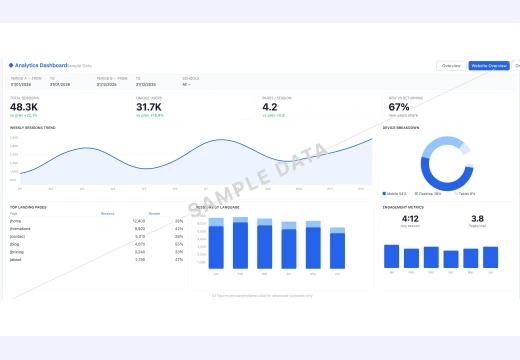
The Website Overview tab focuses on website behaviour, including total sessions, unique users, pages per session, new versus returning visitors, device breakdown, top landing pages with bounce rates, sessions by language and monthly engagement metrics.
-
Organic Overview
The Organic tab allows CADSCHOOL to monitor SEO performance, including organic visits, conversions, CTR and bounce rate. It also includes branded versus unbranded clicks and impressions, organic visit trends, visits by language and a key events table.
-
Paid Overview
The Paid tab provides a clear view of advertising campaign performance, including total spend, paid clicks, paid conversions and cost per lead. It also includes a budget split by campaign type, a breakdown of top campaigns and key paid media KPIs.
-
Multi-school Overview
The Multi-school tab brings together a consolidated multi-school view (Cadschool/ FMP Formation and SAWI), including leads, enrolled students, total digital spend and average cost per lead. It also shows the distribution by school, leads by pipeline stage and leads by training category.
-
Filters
Dynamic filters were implemented to allow easy period selection, school-level analysis and smooth navigation between the different dashboard views.

- Paid media campaign reporting
- Multi-school consolidated view
- Track lead and sign-up performance
- Dynamic filters by period and school
- Smooth navigation between different dashboard tabs
Results
This project gave management a clearer and more complete view of its digital performance, helping the team better understand results, compare periods, analyse marketing channels and support data-driven decision-making.
What Brandfinity delivered
- Power BI dashboard design and development
- Multi-view analytics structure
- Two-period performance comparison
- Website behaviour analysis
- SEO performance tracking
- Paid media reporting
- Multi-school consolidated view
- Lead and enrolment performance tracking
- Dynamic filters by period and school
- Smooth navigation between dashboard tabs
More about CAD GROUP :
Success Stories
Our projects
Find out how we have supported companies in their digital transformation.
See case studies.
Is your organization ready to take the next step in its digital transformation?
We would be delighted to share our expertise and explore how we can help you. Contact us